








古腾堡编辑器增加 live 实况图预览模块
实现原理: WordPress 中引入 LivePhotosKit JS 库来支持实况图,并创建一个自定义古腾堡区块首先,我们需要在 WordPress 中引入 LivePhotosKit JS 库在你的主题的 functions.php 文件中添加以下代码: function enqueue_livephotoskit_script() { wp_enqueue_script('livephotoskit-js', 'https://cdn.apple-livephotoskit.com/lpk/1/livephotoskit.js', array(), null, true); } add_action('wp_enqueue_scripts', 'enqueue_livephotoskit_script'); 这段代码将在你的 WordPress 站点上加载 LivePhotosKit JS 库 接下来,我们将创建一个自定义 Gutenberg 区块,使用户能够方便地在区块编辑器中添加支持实况图的区域 function register_custom_live_photos_bl…
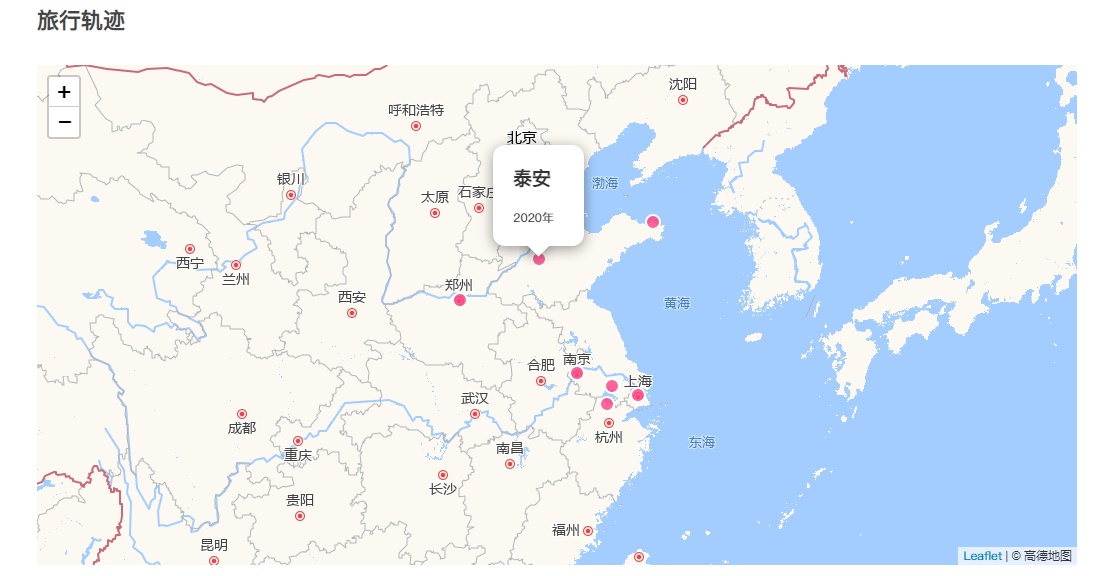
在 WordPress 中插入足迹地图
在 WordPress 网站中添加足迹地图,能以直观的方式展示去过的地点,为网站增添个性化元素。下面将详细介绍通过创建短代码在 WordPress 中插入足迹地图的方法。 一、在 WordPress functions.php 添加短代码 有两种途径可以在 WordPress 中添加相关代码,你可以根据自身情况选择: 直接在主题的 functions.php 文件中添加:打开 WordPress 主题目录下的 functions.php 文件。这是一个对主题功能至关重要的文件,修改时务必小心。在文件中添加以下代码: function custom_map_shortcode() { ob_start(); ?> <div id="map" style="height: 500px;"></div> <link rel="stylesheet" href="https://unpkg.com/leaflet@1.7.1/dist/leaflet.css" /> <script src="https://unpkg.com/leaflet@1…

WordPress为单个文章设置有效期
将代码放在func.php里,然后在后台编辑或新建文章,有一个文章有效期模块,保存或更新后,前台对应文章就会有一个倒计时。时间一到,自动进入回收站。 <?php //文章有效期 CSF::createMetabox('post_validity_options', array( 'title' => '<strong style="text-align:center;">文章有效期</strong>', 'post_type' => ['post', 'page', 'forum_post'], 'context' => 'side', 'data_type' => 'unserialize', )); CSF::createSection('post_validity_options', array( 'fields' => array( array( 'id' => 'post_validity_time', 'type' => 'date', 'desc' => '<strong style="t…

wordpress网站侧边栏添加个人信息卡片
这个设计原创是张洪Heo,感觉还是比较实用的,WordPress网站应该都可以使用,代码是从其他网站看到的,觉着不错就搬运过来了,有需要的可以自取!未作测试,使用前请自行保存数据,非插件,需要自己修改代码。 教程开始 使用小工具里的自定义html模块放到你想放的位置即可 <style> .wniui_card { position: relative; width: 100%; height: 300px; background-image: linear-gradient(62deg, #8EC5FC 0%, #E0C3FC 100%); background-image: -webkit-linear-gradient(62deg, #8EC5FC 0%, #E0C3FC 100%); border-radius: 15px; display: flex; justify-content: center; align-items: center; overflow: hidden; cursor: pointer; user-select: none } .wniui_…
WordPress多站点发布文章同步
在WordPress 站点创建一个API,文章发布时用cURL模拟 POST 请求 API 利用wp_insert_post()函数来创建文章。支持同步文章标题、内容、类型、分类、标签,分类需要另一个站点也有创建相同名称的分类,别名和ID不需要相同。 1、在另一个站点的根目录创建一个命名为post.php的php文件,代码如下: //以下为代码正文 <?php //文章接收 define('WP_USE_THEMES', false); require_once("wp-load.php"); $key='manchuan'; //设置API秘钥 if($_POST['key']==$key){ $categorys=explode(',',$_POST['category']); $category=array(); for($x=1;$x<count($categorys);$x++){ $category[$x-1]=get_cat_ID($categorys[$x]); } $info = array( 'post_titl…

一个简单的过场动画的样式CSS
body:after { content: " "; position: fixed; inset: 0; background-color: white; z-index: 999; background-image: url(https://ttimg.cn/logo1.svg); background-repeat: no-repeat; background-position: center; background-size: 20%; animation: fadeOut 2s; animation-fill-mode: forwards; -webkit-transition: fadeOut 2s; transition: fadeOut 2s; pointer-events: none; background-color: #fff; } @keyframes fadeOut { 50% { opacity: 1; } 100% { opacity: 0; } }

添加好看图形动态背景图
WordPress网站添加一个好看图形动态背景图,样式非常好看,使用简单,CSS代码即可解决的背景美化 代码: body { background-image: url("图片地址");/**这里改为你自己的图片地址**/ background-position-x: center; background-position-y: center; background-repeat: no-repeat; background-attachment: fixed; background-size: cover; } 图片下载地址:https://www.123pan.com/s/fMn5Vv-s6Nod?提取码:wOwe

WordPress添加我的设备页面
演示图 这是我参考张洪大佬的博客里的我的设备(https://blog.zhheo.com/equipment/)进行二次修改的一个小代码,分享出来给各位做个参考。 Html代码 <div class="equipment-item-content"> <div class="equipment-item-content-item"> <div class="equipment-item-content-item-cover"> <img class="equipment-item-content-item-image" alt="小米" src="https://q.ttimg.cn/pic/2024/04/199fc58e68889c74.jpg"> </div> <div class="equipment-item-content-item-info"> <div class="equipment-item-content-item-name"> 小米12S Pro </div> <div class="equipment-i…
WordPress博客添加说说功能和页面
1、首先在主题目录的functions.php里面加入以下代码: //微语 add_action('init', 'my_custom_init'); function my_custom_init() { $labels = array( 'name' => '微语', 'singular_name' => 'singularname', 'add_new' => '发表微语', 'add_new_item' => '发表微语', 'edit_item' => '编辑微语', 'new_item' => '新微语', 'view_item' => '查看微语', 'search_items' => '搜索微语', 'not_found' => '暂无微语', 'not_found_in_trash' => '没有已遗弃的微语', 'parent_item_colon' => '', 'menu_name' => '微语' ); $args = array( 'labels' => $labels, 'public' => true, 'publicly_queryable' => t…

Wp博客单独附件下载插件
给博客写了一个附件下载插件,之前一直用链接不咋好看,然后在网上找都是携带其他功能的然后看着挺杂的,然后自己动手搓了一个纯下载插件。 简单方便,目前只能单个下载按钮。本来是想着自己用的,还是分享出来吧。功能有点单一 喜欢的拿去用吧 演示图: 后台功能: 备用下载: https://www.123pan.com/s/fMn5Vv-ybNod?提取码:manc 懒人下载:


最近发布
最新评论

你的网站也非常不错!
汤圆 /

非常棒的网站!我也是参考的 GitHub 设计语言制作的个人网站。
Carm /

厉害了 那估计我用的是halo版的😄
ayiya /
最好是网页版在线看+能支持导出pdf 这样更实用
ayiya /
我这个是wordpress的 哈哈哈哈
汤圆 /